We’re so confident you’ll love True Arbor that your first three months are on us. Easy to get started. No complicated sales demo required.
No base company fee. Cancel anytime.
Introductory offer: sign up before December 1, 2026.
Designed for your phoneKeep field work moving offlineConnected from quote to invoice
YOUR TODAY SCREEN · YOUR BUILT-IN BUSINESS ASSISTANT
See what’s outstanding. Know what to do next.
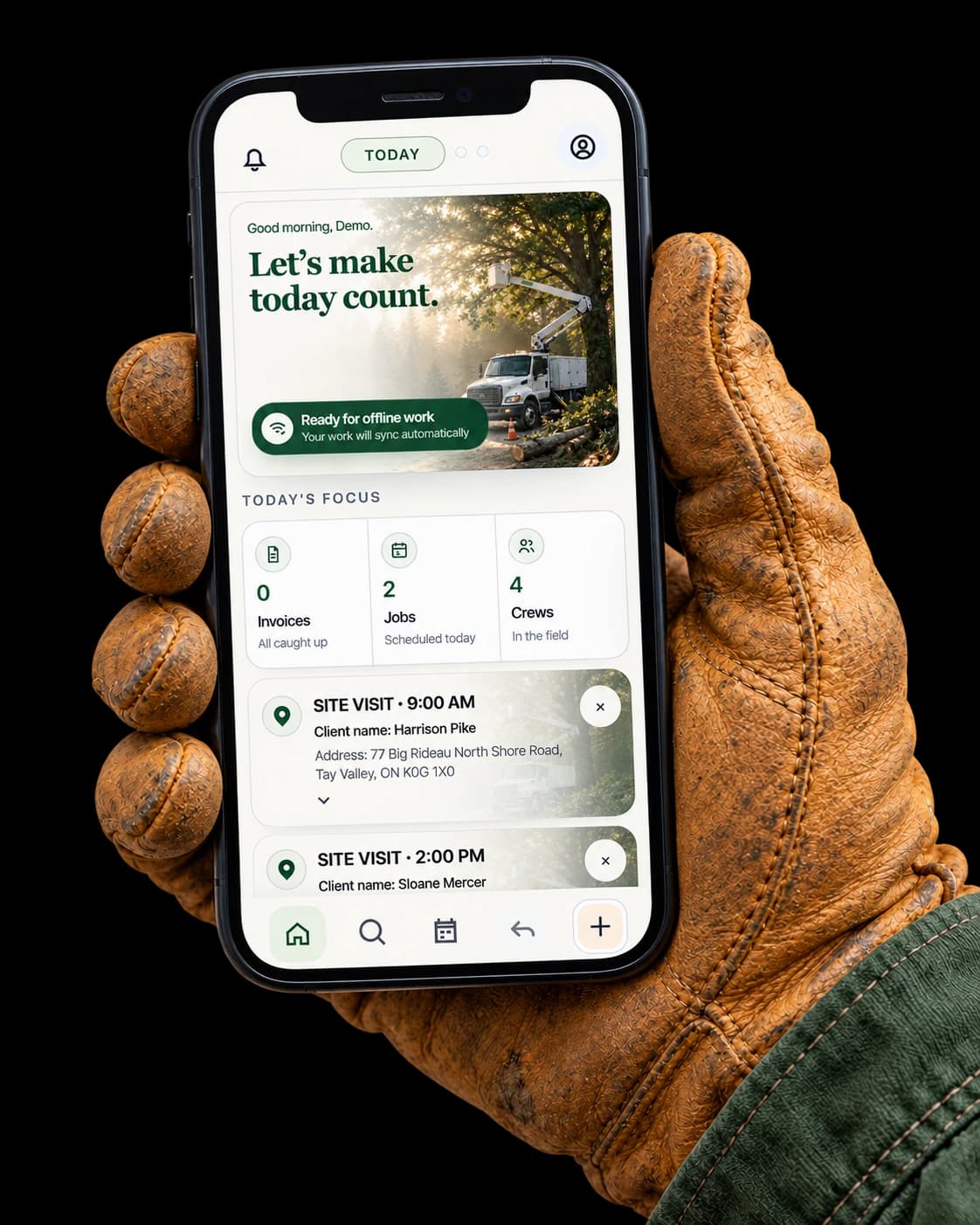
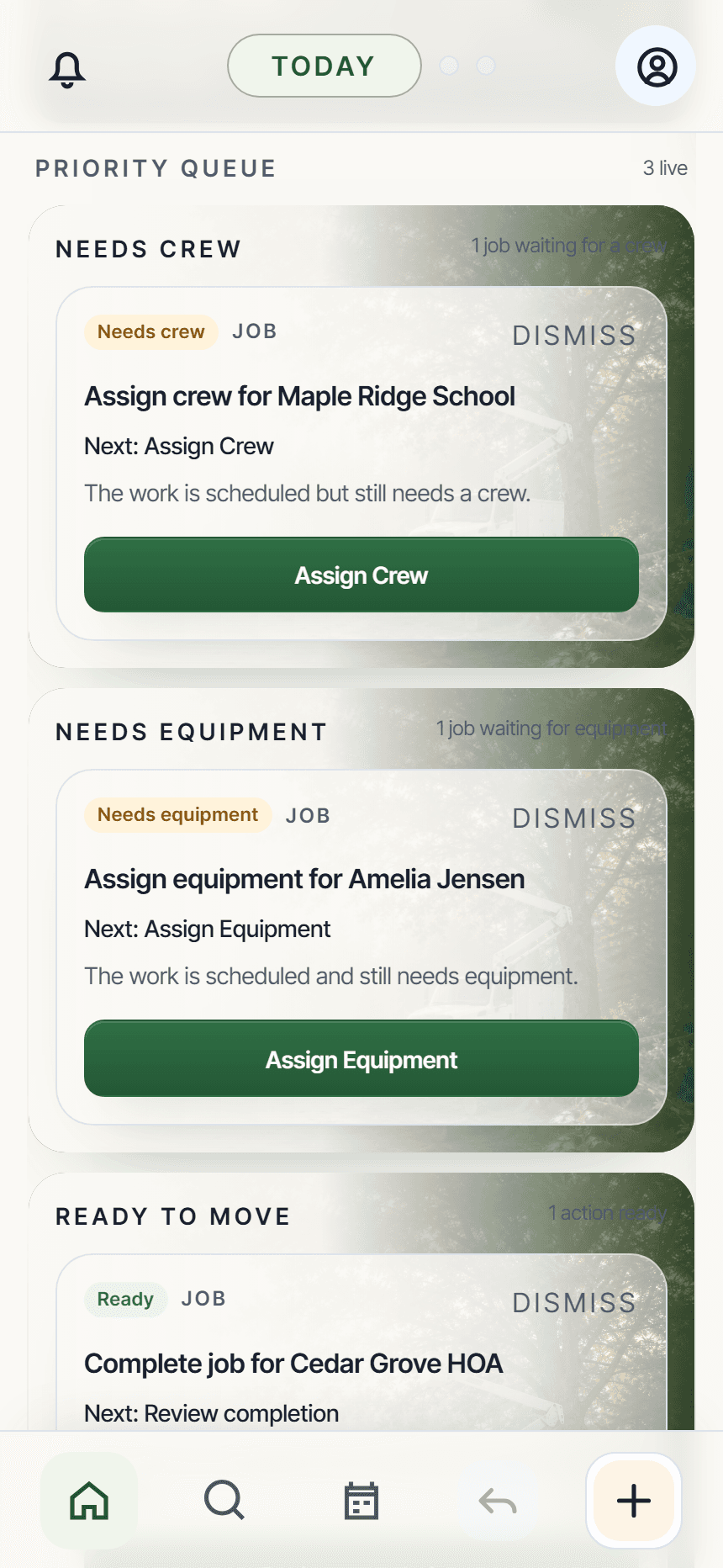
Less to remember. A clearer way to follow through. Your Today screen brings outstanding work, customer requests, and the day’s schedule together, with clear actions to help you keep jobs moving and billing on track.
01
Keep customer follow-ups in view
See customer questions, quote changes, and requests waiting for a response. Open the details and take the next action from your Priority Queue.
02
Move work toward the next invoice
Schedule approved jobs, assign your crew and equipment, review completed work, and prepare invoices with clear actions connected to each job.
03
Stay ahead of the day
See scheduled work, site visits, and equipment maintenance or inspections due today. Keep client requests in view and your crew connected through built-in chat.
A clearer starting point, with you in control. Review messages and decisions before sending or making changes.
Real app. Demonstration workspace.
FROM FIRST CALL TO FINAL PAYMENT
Great tree work. A simpler business behind it.
Your day doesn’t happen at a desk. Keep the details moving with you, without rebuilding the same information at every step.
01
Capture the opportunity
Start a job while the call is fresh. Keep the customer, address, notes, and site details together.
02
Quote with confidence
Build a professional quote and give your customer a clear link to review, ask questions, and approve.
03
Get the work done
Plan the schedule, organize people and equipment, and keep field updates with the job.
04
Close the loop
Create the invoice, offer convenient payment options, and see what still needs attention.
YOUR CLIENTS · YOUR CONVERSATIONS
Your customers. Your next job.
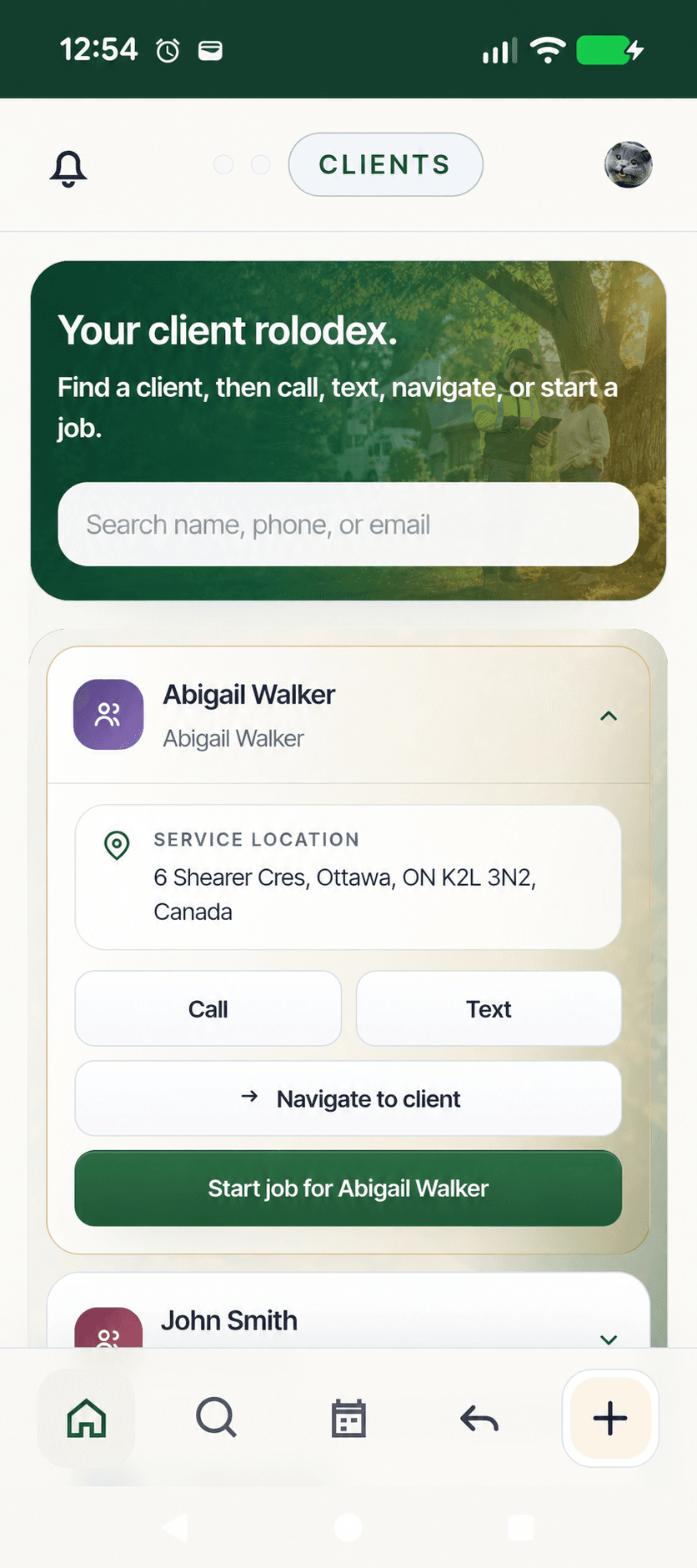
Your customer rolodex, ready wherever you work. Keep customer details, conversations, and jobs together, from the first enquiry to the next time they need you.
01
Start the next job without starting over.
Find an existing customer and start a new job with their saved contact and property details. Keep previous work close at hand when they call again.
02
Call, text, or get directions.
Search by name, phone, or email. Open a customer’s contact options or navigate to their property from the same place.
03
Stop rewriting the same messages.
Review and send consistent customer emails with links to confirm a visit, ask a question, or request a change. Keep those responses connected to the work.
04
Know who needs an answer.
Your Today screen shows customer questions, requests, and next steps, from sending a quote to invoicing completed work.
You review customer emails before sending. Calls and texts open your phone’s apps; customer responses through True Arbor stay connected to the job.
True Arbor Clients. Example customer details.
OFFLINE MODE · BUILT FOR THE FIELD
No signal? Keep the job moving.
Out of service doesn’t have to mean out of action. Work with saved job details and capture supported changes on your device. True Arbor queues them until you’re connected again.
01
Open your jobs before you go.
While online, prepare the jobs and details you’ll need in the field.
02
Keep working without reception.
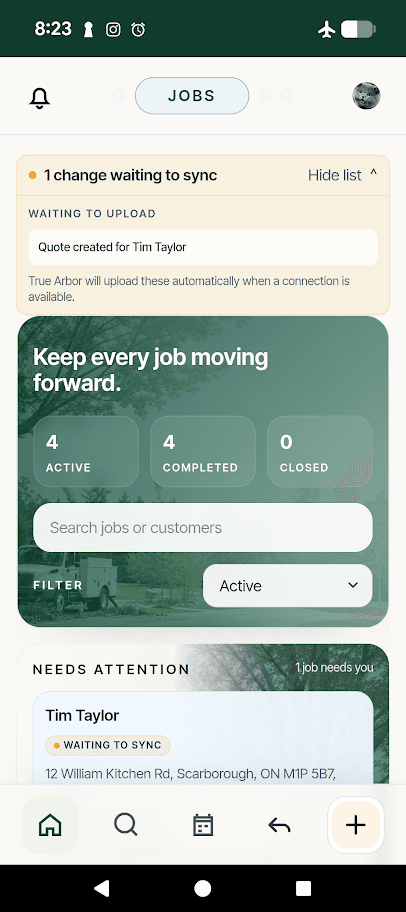
Save supported updates, such as notes and quote drafts. “Waiting to sync” shows what’s still on your device.
03
Reconnect. Let your changes catch up.
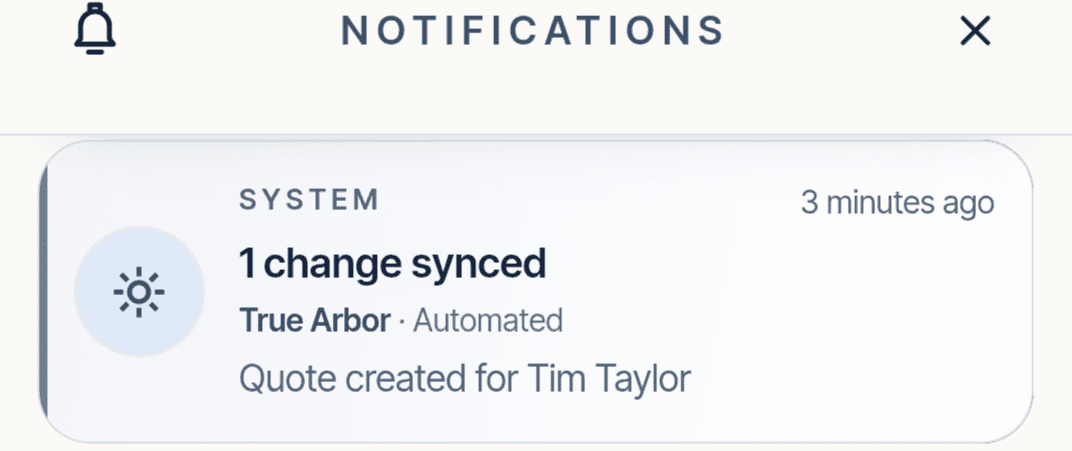
With True Arbor open, queued changes sync automatically when a connection is available. Check the sync status before moving on.
Back online: confirmation your change synced.
Prepare while online. Keep the app open or reopen it to sync. Live chat, sending emails, fresh map imagery, and online payments need a connection. If an update needs review, True Arbor will flag it.
✓
No signal. Still making progress.Save now. Sync when connected.
Real app. Offline queue and sync notification.
START WITH THE CUSTOMER
A name. A place. A job underway.
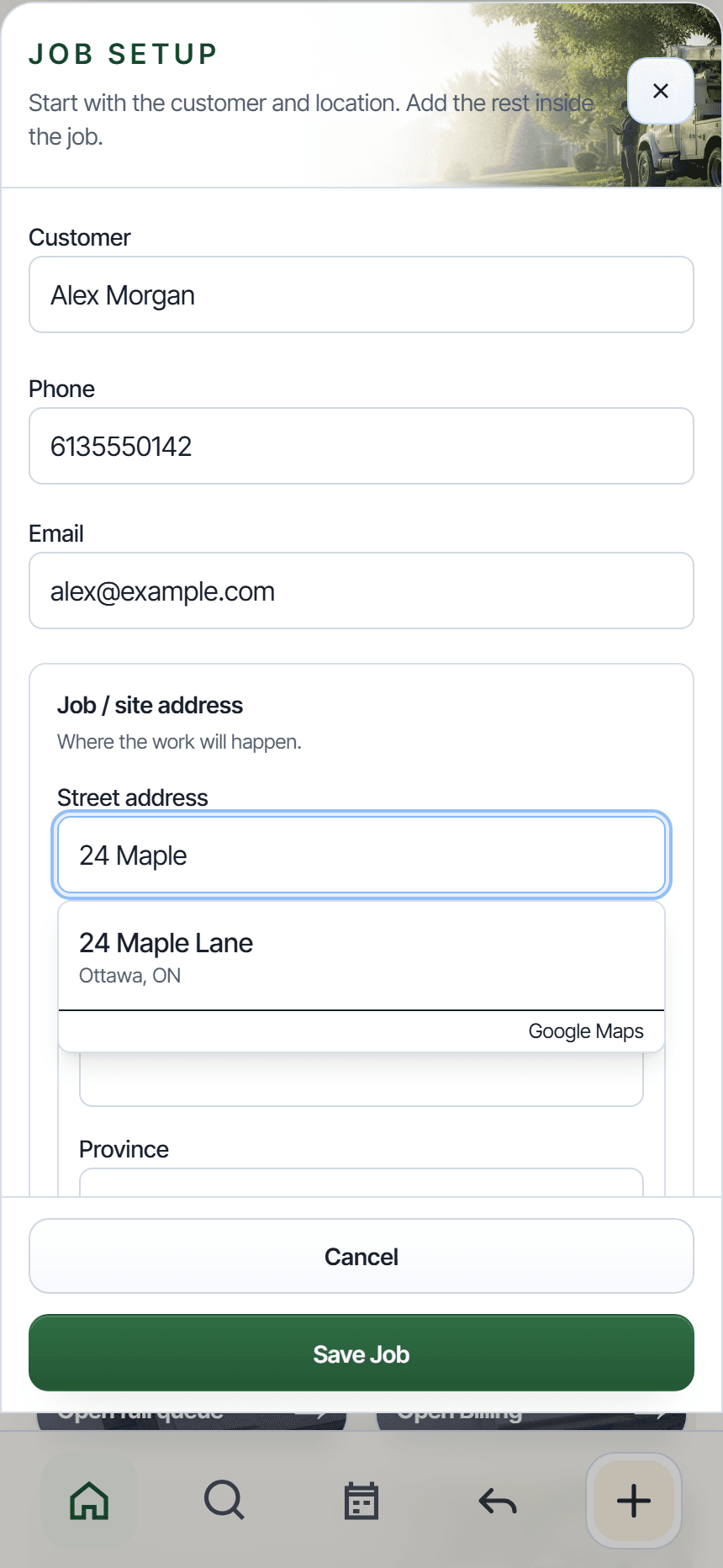
Capture the customer and where the work will happen. Google Maps address suggestions help you find the location; open directions from the job when it’s time to go.
Keep contact details and the job address together.
Add the details as you learn more.
✓
Start simple.Build the rest as you go.
Real app. Fictional customer and address suggestion.
YOUR JOB. YOUR PROCESS.
Site visit first? Quote now? Straight to work?
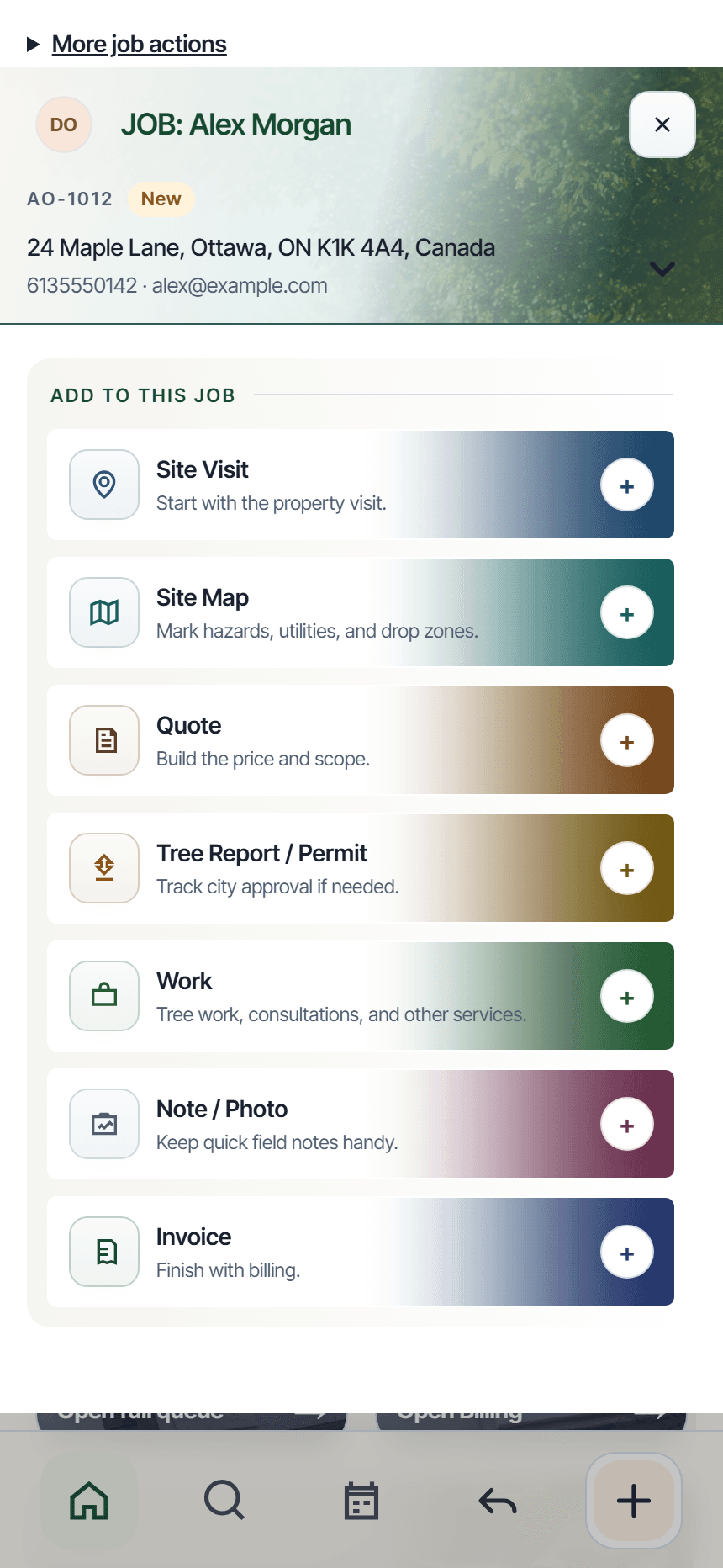
True Arbor adapts to how you work. Start with the customer, then add a site visit, quote, work, or invoice when you need it, all within the same job.
Add a site map, photos, and notes along the way.
Keep the scope, schedule, and price connected.
✓
Your process. One job.Choose the next step that fits.
Real app. Demonstration job.
PLAN YOUR DAY BEFORE YOU SET OFF
Your stops. In the order that works.
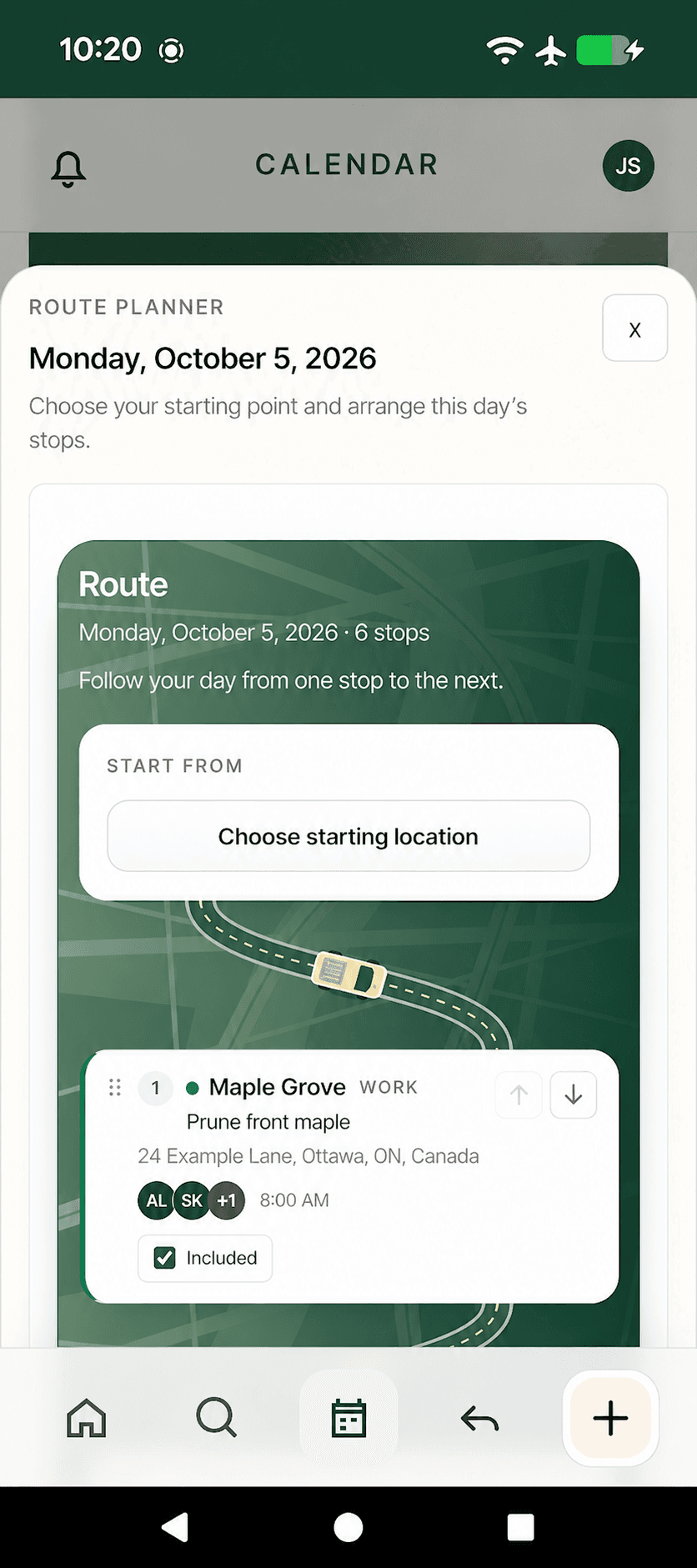
Plan today’s route or choose a future day in Calendar. Bring scheduled jobs and site visits together, choose your starting point, and arrange the stops around your day.
Start from your current location or an address you choose.
Include the stops you need. Reorder with drag-and-drop or the arrow controls, without changing appointment times.
Open your arranged route in Google Maps for directions.
✓
Plan ahead. Head out ready.Choose your stops. Set your order.
App screenshot adapted with fictional customer and crew details.
PLAN IT ON YOUR PHONE
Put the site plan where the work happens.
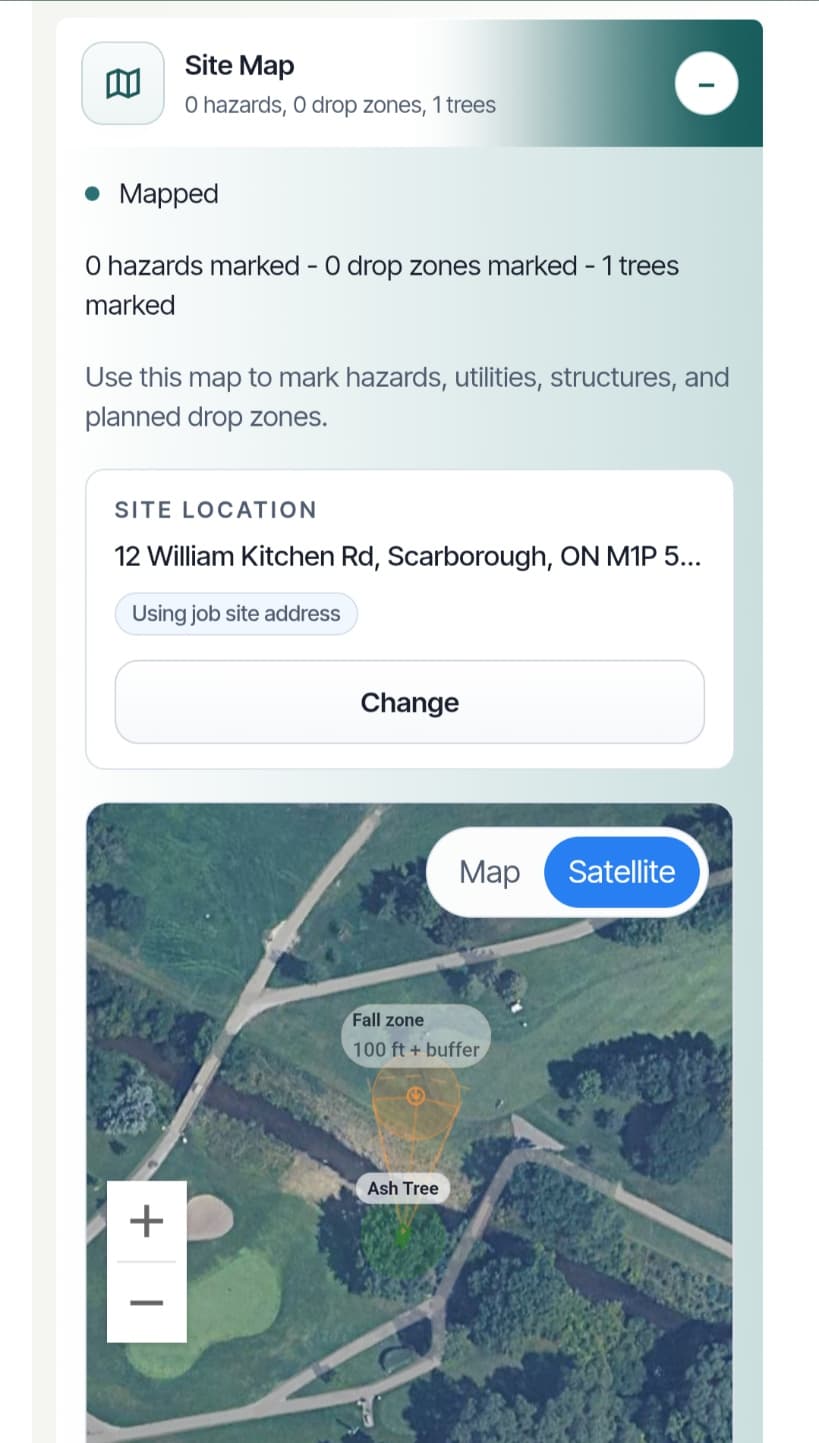
Create a site map directly inside the job. Mark trees, hazards, utilities, structures, and planned drop zones so the important details stay with the work.
Use Google map or satellite views when connected.
Revisit supported saved plans when imagery is unavailable.
✓
Mark it. Keep it with the job.Site details, close at hand.
Real app. Satellite view with site-planning annotations.
YOUR CLIENT IS PART OF THE WORKFLOW
Send the next step. Get a clear response.
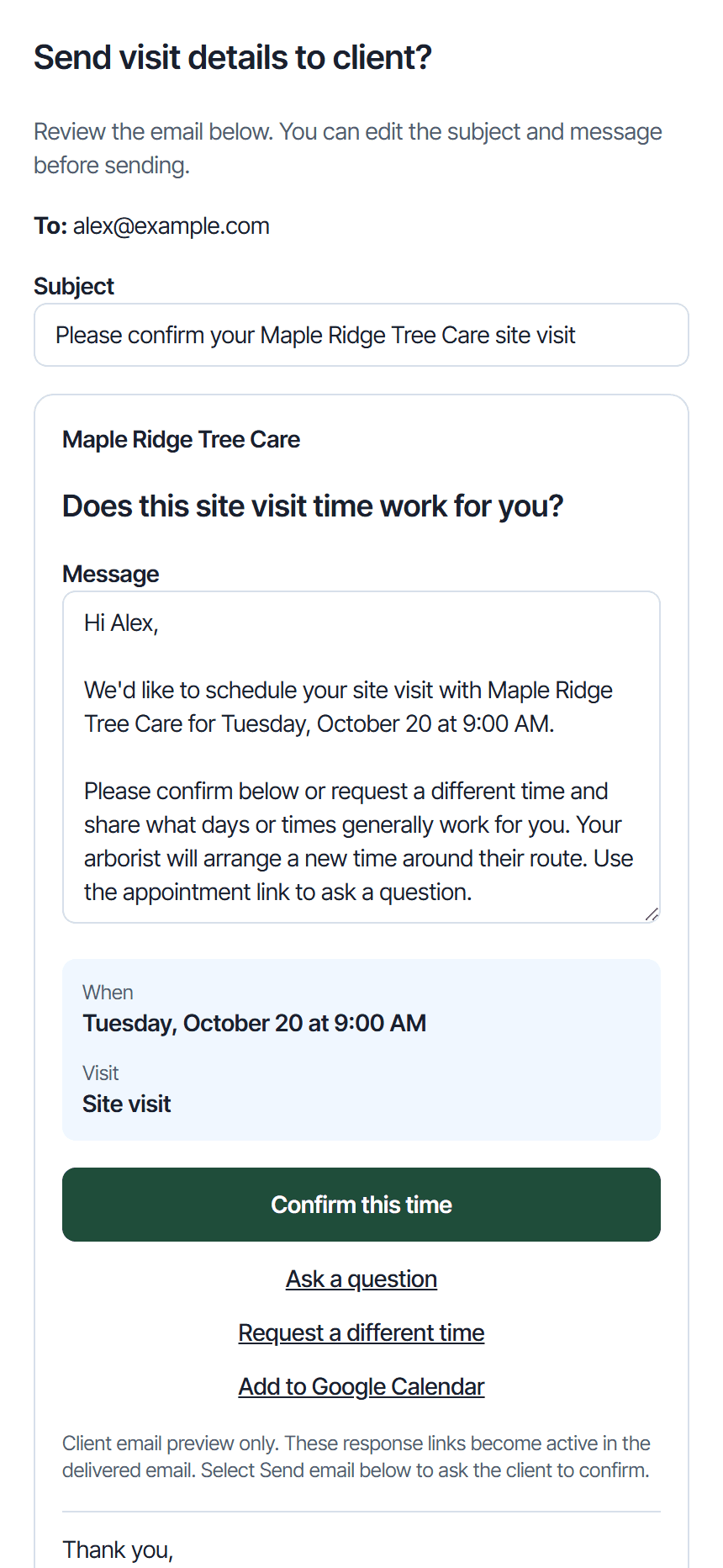
Send appointment details, quotes, and invoices from True Arbor. Clients can confirm proposed visit or work times, request a change, approve quotes, and ask questions through the links you send.
Review your email before you send it.
Keep client replies connected to the appointment, quote, or invoice.
✓
Less chasing. Clearer answers.Keep your client in the loop.
Real app email preview. Demonstration details.
CREW CHAT · BUILT RIGHT IN
Your crew. Your conversations. Connected to the job.
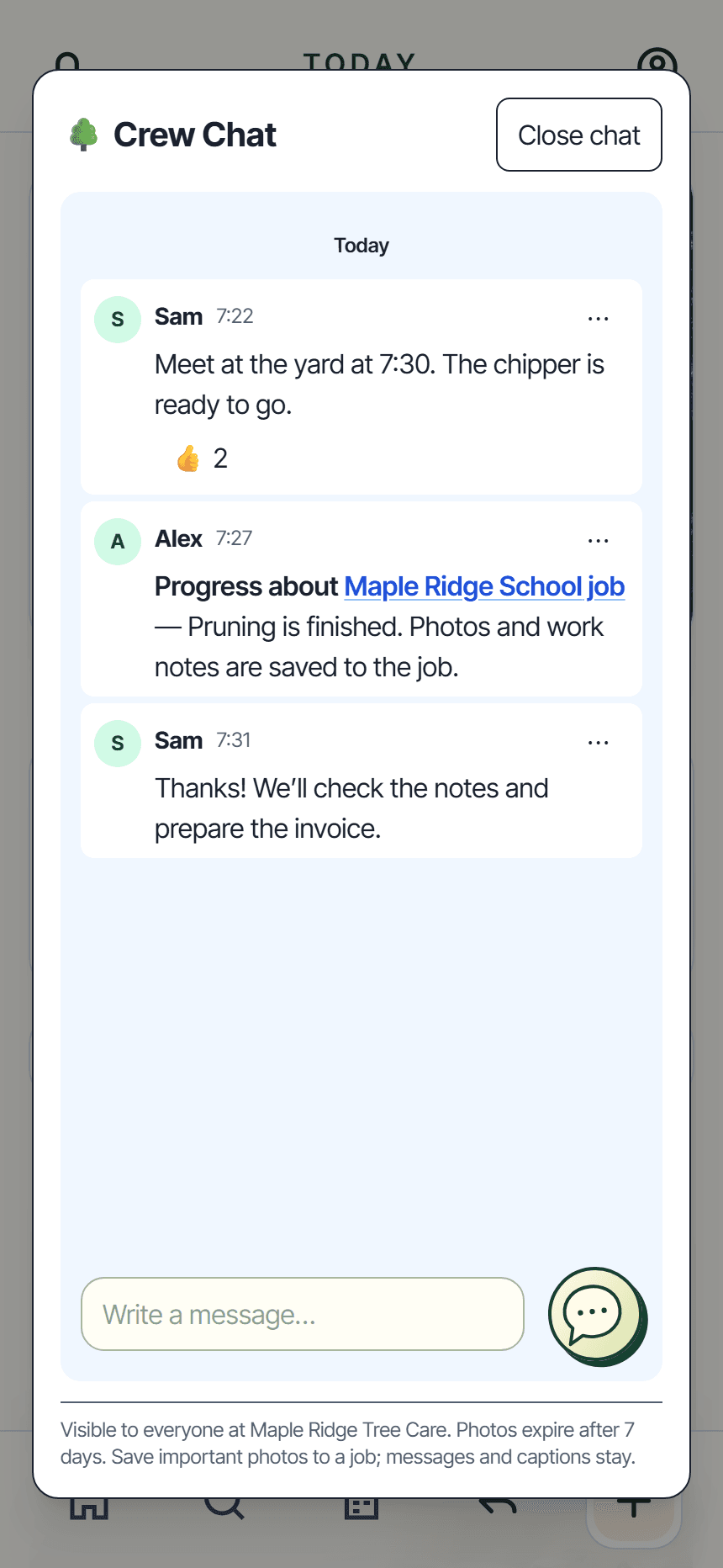
Keep the office and field crew in the same conversation, with the job details close at hand.
Show the crew what you see. Take a photo or attach images from your phone.
Tie comments to a job. Share progress, a delay, extra work, or a question with a linked job update.
Keep conversations clear. Reply to a message, react with a quick acknowledgement, or pin a message for everyone.
Keep important photos. Save a chat photo to the job so it stays with the work after the chat copy expires.
Get straight to the details. Open linked jobs your role and assignments give you access to.
Crew Chat needs an internet connection. Chat photos expire after 7 days; save important photos to the job.
Real app. Demonstration conversation.
SEE IT IN ABOUT A MINUTE
From first call to site visit.
Watch how easy it is to add a customer, book a site visit, email the appointment details, and create a site map.
One everyday example of how True Arbor helps you get things done. That same simple, flexible approach runs throughout the app.
Real app. One simple workflow.
A BETTER EXPERIENCE ON BOTH SIDES
Clear for you. Easy for your customers.
01 / COMMUNICATE
Keep the conversation connected.
Spend less time composing the same emails. Review consistent messages and customer links before sending. Customers can confirm visits, request another time, ask questions, request quote changes, and approve, with their responses kept on record and connected to the work.
02 / GET PAID
From invoice sent to payment recorded.
Connect Stripe for online card payments, with Apple Pay and Google Pay where supported. Prefer cash, cheque, or e-transfer? Share your manual payment instructions. Use either approach or both.
Successful online payments update the invoice balance automatically and appear in job activity. Deposits count toward the total; the invoice is marked paid when the balance is settled.
Online options depend on your Stripe setup and the customer’s device. A 0.5% True Arbor platform fee plus Stripe processing fees applies to online payments.03 / STAY ORGANIZED
Your clients and contacts, all together.
Keep customer names, contact details, and job records in one workspace, alongside site photos, schedules, equipment, job costs, and receipts. From a first enquiry to repeat work, the details have a home.
THE EVERYDAY DETAILS, COVERED
More ways to keep work organized.
From the first customer call to the office paperwork, keep the supporting details in one place.
✓
Client contacts
Your client rolodex, ready to go. Find a customer, call or text, open directions, or start their next job.
✓
Your team. The right access.
Invite employees and manage their access. Owners and admins manage the business; crew members get tools for their assigned work.
✓
Export for QuickBooks
Check invoice details and download a QuickBooks-ready CSV. Import the file into QuickBooks when you’re ready.
✓
Equipment, organized
See what’s available, assign equipment to jobs, and keep maintenance details in view.
✓
Receipts & job costs
Capture receipts and track job costs and business expenses. Keep the paperwork close to the work.
✓
Company safety guides
Publish your company’s procedures and checklists for crew to reference. Optional guides, available in their account.
CONNECTED TO THE TOOLS YOU USE
The work stays together. The right tools fit right in.
From finding the property to recording the payment, keep the useful connections close to the job.
Google Maps
FIND IT. PLAN IT. GET THERE.
Find job addresses, use map and satellite views for site planning, and open your arranged route in Google Maps for directions.
Address suggestions and fresh map imagery need a connection.
Stripe
MAKE PAYMENT THE NEXT EASY STEP.
Offer online card payments, plus Apple Pay and Google Pay where supported. Successful payments update the invoice balance automatically.
Optional online payments: a 0.5% True Arbor platform fee plus Stripe processing fees. Cash, cheque, and e-transfer records remain available.Learn about Stripe (opens in a new tab) ↗
Google Calendar
HELP CUSTOMERS KEEP THE DATE.
Site visit emails include an Add to Google Calendar link, alongside the customer’s options to confirm, ask a question, or request another time.
An add-to-calendar link; not an ongoing calendar sync.
QuickBooks export
KEEP BOOKKEEPING MOVING.
Review invoice details and download a QuickBooks-ready CSV to import into your accounting workflow.
File export and import; not an automatic accounting sync.
SIMPLE PRICING · EVERY FEE, UPFRONT
One straightforward price. Room for your whole team.
A plan for full-time arborists, part-time businesses, and growing crews. First 3 months free, then $50 USD per active person/month, including you. No base company fee. No annual contract.
First 3 months free.
$50 USD / person / month after your trial
Work solo or bring your team. The same core tools, with access for each person’s role.
No base company fee. Cancel anytime.
After your trial, your company pays monthly for each active person, including you. Cancel before your trial ends to avoid subscription charges. Applicable taxes are extra.
Start secure signup with Stripe before December 1, 2026 at 12:00 a.m. Eastern to get the introductory offer.
Your three calendar months start when your secure signup page is first prepared. You’ll see the exact end date before you confirm. Returning to signup won’t restart your trial.
You’ll add a card securely with Stripe. Your first subscription payment is after your free trial. Your plan then renews monthly unless you cancel.
Working solo or adding your team
Start on your own or invite your team during your free trial. Everyone shares the same trial end date, so people who join later are free for the remaining time.
After the trial, each active person costs $50 USD per month, including you. Sending an invitation is free; unaccepted invitations aren’t charged.
After the trial, adding an active account adds a charge for the rest of that month. Removing an account gives you credit for its unused time.
Canceling your plan
You can cancel anytime in Subscription & Billing. Cancel before your trial ends to avoid subscription charges. If you cancel during a paid month, you can keep using True Arbor until that month ends.
Your day-to-day tools, together.
Today’s priorities, customer requests, and clear next steps.
Clients, contacts, jobs, quotes, and invoices.
Scheduling, route planning, and site maps.
Crew access, chat, receipts, and job updates.
Supported offline work and QuickBooks CSV export.
START SMALL. BUILD YOUR ROUTINE.
No sales demo, no pressure, nothing complicated to explain. Start with your first job.
A short welcome guide shows you around. Add a client, create a job, and let Today help you see what comes next.
True Arbor is built by SkyLift Partners, alongside arborists who know the work. Have questions or want help getting started? You can talk to the people behind the product.
Start with your confirmed company country: $50 USD per active person/month, including the owner. Start secure Checkout before December 1, 2026 at 12:00 a.m. Eastern for 3 calendar months free. The free period starts when Checkout is first prepared; Stripe shows your fixed trial end date. Team members share that date. Credit card required unless an approved test offer says otherwise. Taxes are additional. Cancel anytime in Subscription & Billing.
Do I need to book a demo?
No sales demo is required. A short welcome guide introduces Today, your connected job workflow, and the tools for your role. Start with a customer and build your first job step by step. You can reopen the guide or contact us for help.
Does True Arbor send follow-ups for me?
Today brings supported questions, requests, and next steps into view. Open the relevant work, review the details, and choose what to do. You review customer emails before sending them.
Can I use True Arbor on my phone?
Yes. True Arbor is designed around working from your phone and can be installed on supported devices for quick access. You can also use a larger screen when you’re back at the office.
Is it for full-time or part-time arborists?
Both. Whether tree care is your full-time business or you take on work part time, start with your own workspace for clients, contacts, quotes, and jobs. Working with a team? Bring your administrator and crew into the same workflow with role-based access.
Do I have to connect Stripe?
No. You can use manual payment instructions, connect Stripe for supported online payments, or offer both. Optional online payments have a 0.5% True Arbor platform fee plus Stripe processing fees, separate from the subscription. Stripe can be set up later in your account settings.
A CLEARER DAY STARTS HERE
Full time. Part time. True Arbor has you covered.
One place for your clients, your crew, and your next job. Built specifically for arborists.